Find Parcels
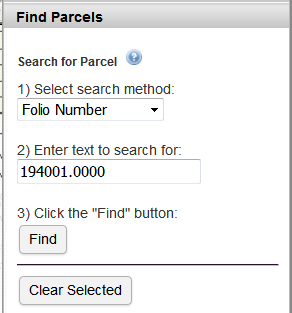
The Hillsborough County Property Appraiser parcel map is the basis for all parcel searches. The Planning Commission updates its parcel data on a quarterly basis. For the most up-to-date information, please contact the Hillsborough County Property Appraiser's Office.
Perform a search:
- Select the search method (Folio Number, Owner Last Name, or Street Name).
- Enter the text to search for in the input box.
- Click the "Find" button to perform the search.
The search will find any parcel where the search method field begins with the text. For example, searching Owner Last Name for the text "Master" will find parcels whose owner's last name is "Masters", "Masterson", etc.
Tips:
- For Folio Number searches, enter either the entire folio number of the parcel with the 4 digit extension (e.g., 194001.0000), or enter just the beginning part of the number (e.g., 194001).
- For Folio Number searches, do not enter the leading zero(s) of the folio number.
- For Folio Number searches, use a decimal point (not a hyphen) to separate the decimal portion.
- For Owner Last Name searches, enter only the owner's last name.
- For Street Name searches, enter only the base street name for the address -- do not enter number, direction, or type (e.g., RD).
Search results:
If parcels are found that match the search criteria, a pop-up box will open containing the list of parcel(s).
- The parcel list can be sorted by clicking on the column heading.
- Clicking on a row will zoom the map to the highlighted parcel (shaded yellow). Note: The other parcels in the list are shaded blue.
- The parcel list can be downloaded as a CSV file (which can be opened in Excel) by clicking the "Download Parcel Results" link.
- Close the pop-up box containing the parcel list by clicking the "x" in the upper right-hand corner.
Click the "Clear Selected" button to remove the selected parcels from the map.